post image

The Role of Powder Adhesive Technology in DTF Printing

DTF printing has rapidly gained popularity for its ability to deliver vibrant, durable designs on a wide range of fabrics. At the heart of this process lies powder adhesive technology, a critical component that determines how well prints bond, stretch, and withstand repeated washing. Understanding how adhesive powders function and why quality matters can help printers achieve consistent, professional results across different materials. Many professionals rely on insights and resources found on this website to stay informed about evolving DTF techniques and materials. As printing demands grow more complex, exploring the role of powder adhesive technology becomes essential for improving print performance and long-term reliability.

How Powder Adhesive Enables Strong Fabric Bonding

Powder adhesive acts as the connection layer between the printed design and the fabric surface. After the ink is laid onto the film, the adhesive powder melts during curing, creating a bond that anchors the design to the textile fibers. This process allows prints to stretch naturally with the garment, rather than cracking or peeling. Different fabrics respond differently, which is why powder consistency and melt behavior matter so much. A well-applied adhesive layer ensures even coverage and smooth edges, resulting in transfers that feel soft while remaining firmly attached through repeated wear and washing cycles.

Impact on Print Durability and Wash Resistance

Durability is one of the biggest reasons powder adhesive technology matters in DTF printing. A stable adhesive layer protects the ink from lifting or fading during washing or stretching. Poor-quality or uneven powder application can lead to weak bonding, causing prints to break down more quickly. Modern adhesive formulations are developed to withstand temperature changes, moisture, and friction without compromising flexibility. This balance allows finished garments to maintain their look while remaining comfortable. For brands and printers, strong wash resistance reduces customer complaints and increases confidence in the finished product.

Consistency and Efficiency in Production Workflows

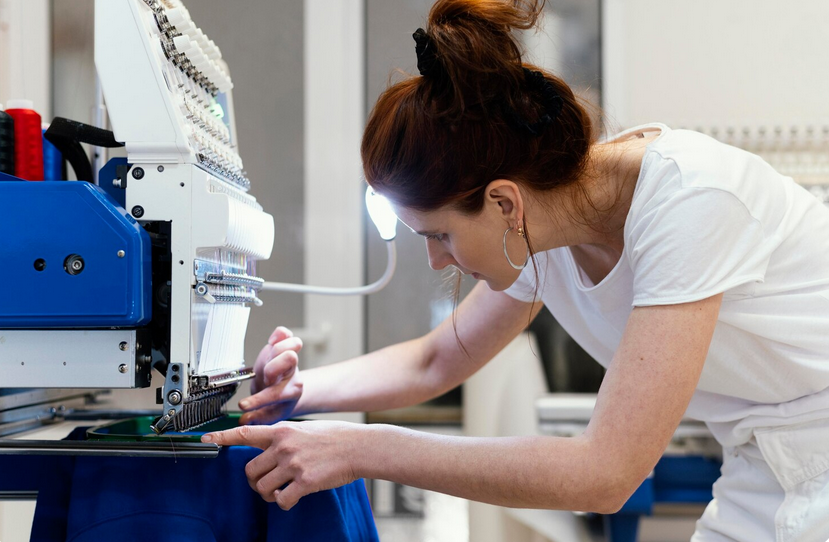
machine

Powder adhesive technology also affects workflow efficiency. Uniform powder grain size supports predictable melting behavior, which helps maintain steady production speeds. When adhesive spreads evenly and cures consistently, printers spend less time adjusting settings or redoing transfers. This reliability supports larger order volumes without sacrificing quality. Automated powder application systems further improve consistency by reducing human error during coating. As DTF operations scale, dependable adhesive performance helps streamline production and maintain uniform output. Consistent results save time, materials, and energy, benefiting both small shops and high-volume production environments.

Supporting Versatility Across Fabric Types

One major advantage of powder adhesive systems is their ability to support many fabric types. Cotton, polyester, blends, and specialty textiles each require slightly different bonding behavior. Advanced adhesive powders are formulated to adapt to these variations without requiring major process changes. This flexibility allows printers to expand their product range without investing in multiple systems. Reliable adhesion across materials supports creative freedom while maintaining professional results. By handling diverse fabrics smoothly, powder adhesive technology strengthens DTF printing as a versatile solution for modern apparel decoration needs.

Powder adhesive technology plays a foundational role in the success of DTF printing. It supports strong bonding, long-lasting durability, efficient workflows, and fabric versatility, all of which influence final print quality. While often overlooked, this component directly affects how designs perform in the real world. As DTF printing continues to grow, advancements in adhesive formulations will remain essential to meet higher expectations for comfort and longevity. Understanding and selecting the right powder adhesive helps printers deliver reliable results while maintaining consistency and confidence across every finished garment.…

post image

MX Player Codecs on PC: What You Need for Advanced Formats

Anyone who keeps a messy folder of random video files knows the pain. One file plays fine, the next throws an error like it is offended by your existence. That frustration is exactly why people keep talking about mx player even years after its mobile fame peaked. On PC, the app’s real power lives in its codec handling, not the interface. Codecs decide if your video plays clean or collapses into static and silence. This topic sounds dry, but stick with me. Codecs are the unsung heroes of video playback. Without them, your media player is just a fancy file opener.

What Codecs Actually Do Behind the Scenes

A codec is basically a translator. It takes compressed video data and turns it into something your screen and speakers can use. If the translator speaks the wrong language, the video fails. That is where many PC players stumble. MX Player approaches this differently. Instead of relying only on system codecs, it uses its own internal libraries. This gives it control over playback behavior. Files behave more consistently across machines. Less drama. More play. On PC setups, especially through emulation, this design choice matters. You avoid conflicts with other media apps. Everything stays self-contained.

Why Advanced Formats Cause Trouble on PC

Advanced formats like HEVC, 10-bit video, or high-profile MKV files are heavy. They demand more from decoding engines. Many players either refuse them or push all the work to the CPU. That leads to stutter city. MX Player supports these formats using software decoding when hardware falls short. That flexibility keeps videos moving. You may hear fans spin, but playback continues. That trade-off beats a frozen screen. Audio formats also trip players up. Multi-track or uncommon audio streams can break sync. MX Player handles switching cleanly. No reloads. No tantrums.

ARM vs x86 Codecs and Why It Matters

Here is where PC users get confused. MX Player was built for Android, which uses ARM processors. PCs usually run on x86 architecture. Codecs must match that gap. On PC, the correct codec pack determines success. ARM codecs behave differently under emulation. Choosing the right version avoids crashes and missing audio. This is not guesswork. Architecture matters. Once matched properly, playback smooths out. Advanced formats stop acting cursed. Videos load faster. Stability improves across sessions.

Hardware Acceleration and Smart Fallbacks

Hardware acceleration sounds fancy, but it is just your GPU helping decode video. MX Player uses it when available. When it fails, the app quietly switches to software decoding. That switch is fast. Many players crash due to hardware decoding glitches. MX Player just shrugs and adapts. That reliability is why people stick with it. You get fewer interruptions. On PC, this also means better control. You can tweak settings based on your machine. Older laptops benefit the most.

Subtitle and Container Support That Actually Works

Advanced formats often come packed with subtitles, chapters, and multiple streams. Some players choke on that bundle. MX Player handles it calmly. Subtitles load instantly. Timing adjustments are easy. Container formats like MKV are treated as normal citizens, not exotic beasts. MX Player codecs on PC are not magic. They are just smartly implemented. Wide format support, flexible decoding paths, and steady behavior make advanced files playable. If your media library feels cursed, the problem is usually codec support, not the file. Get that part right, and everything else falls into place.…

post image

How Tech Creators Film Clean Instagram Reels at Home Without a Studio

Scroll through Instagram, and you will notice something fast. Many tech creators film at home, yet their Reels look polished and calm. No echo. No harsh shadows. No messy background stealing attention. Growth tactics like buying IG followers sometimes get discussed in creator circles, but clean visuals and sound still do most of the heavy lifting. The good news is simple. You do not need a studio or a fancy crew. You need a few smart habits and a controlled setup. Once those are in place, filming becomes routine instead of stressful. So read on, and we’re going to spill some secrets on how tech creators film clean Reels at home without a studio.

Lighting Is the Silent Hero

Lighting decides how professional a Reel feels within seconds. Most creators rely on soft, consistent light instead of brightness alone. A window works great, especially in the morning or late afternoon. Curtains or thin blinds help smooth harsh rays. Artificial lights step in when daylight disappears. A single soft light placed slightly above eye level often beats multiple lamps. Shadows should fall gently, not carve lines across the face. When light behaves, cameras suddenly look more expensive.

Sound Quality Changes Everything

Viewers forgive average video faster than bad audio. Clean sound keeps people watching. Many creators use small clip-on microphones because phones struggle with room noise. These mics cost less than a dinner out but save hours of editing. Also, curtains, rugs, or even a couch help absorb echo. A calm audio track feels invisible, and that is the goal.

Camera Settings Stay Simple

camera setting

High resolution alone does not equal better video. Most creators shoot in 4K only when they plan to crop later. Otherwise, stable 1080p works just fine. Frame rate usually stays consistent across videos to keep motion natural. Manual control sounds scary, but it starts small. Locking exposure stops flickering. Locking focus avoids blurry surprises. Once settings stop changing mid-shot, creators relax. Calm filming shows on screen more than people realize.

Backgrounds Are Chosen on Purpose

Clean Reels often come from boring backgrounds. Plain walls, shelves, or desks keep attention centered. Busy rooms pull eyes away from the message. Some creators even rotate furniture just for filming. Depth helps too. Standing a few feet from the background creates separation. That soft blur feels cinematic, even on phones. Visual breathing room matters more than decoration. Simplicity reads as confidence on camera.

Editing Is Where the Polish Happens

Creators rarely post raw clips. Editing tightens pacing and removes hesitation. Simple cuts keep energy high without looking jumpy. Captions help viewers who watch on mute, which is many people. Color tweaks often stay subtle. Overdone filters scream amateur. Small adjustments to brightness and contrast usually do enough. The goal is clarity, not drama. Editing should support the message, not steal focus. In short, filming clean Instagram Reels at home comes down to control. Control the light. Control the sound. Control the space. Once those pieces behave, creativity feels lighter, and filming stops feeling like a chore.…

post image

The YouTube Creator Tech Stack of 2030: Tools That Don’t Exist Yet

If you think today’s YouTube gear setup is advanced, just wait until 2030. The creative landscape is shifting so fast that by the end of the decade, the tools creators depend on may look almost unrecognizable. Cameras will think like directors, editors will collaborate with AI co-pilots, and entire production cycles could become semi-autonomous. Imagining this future isn’t just fun—it’s a sneak peek at how digital creativity may evolve as technology pushes boundaries and reshapes what it means to be a creator.

AI Co-Directors Guiding Every Shot

By 2030, creators may lean on AI co-directors that analyze lighting, camera angles, pacing, and mood in real time. These systems could make on-the-fly suggestions or even auto-adjust settings to achieve a particular cinematic style. As channels become more competitive and creators explore strategies like learning how to buy YouTube likes to increase video’s visibility to give their uploads traction, having an AI assistant that ensures every shot looks professional could become the norm. These tools won’t replace creativity—they’ll expand it.

Emotionally Adaptive Editing Suites

editImagine an editing program that doesn’t just cut footage but understands emotional beats. Future editing software could detect when a scene should feel suspenseful, warm, or comedic and assemble transitions, music, and pacing automatically. Creators would still guide the final tone, but the grunt work of searching for clips, adjusting audio, and tweaking timing could be handled by emotionally aware algorithms. This shift frees up mental space for creators to focus on storytelling rather than mechanics.

Holographic Workspace Environments

Instead of editing on flat screens, creators might step into a holographic workspace where timelines, assets, and effects float in three-dimensional space. Moving clips around could be as intuitive as rearranging objects on a desk. Holographic interfaces may also enable more immersive collaboration, letting teams work together in shared virtual spaces regardless of where they physically are. Creativity becomes tactile, spatial, and deeply interactive.

Predictive Performance Dashboards

laptop Analytics won’t just show what happened—they’ll show what will happen. Predictive dashboards could forecast how a video will likely perform based on title phrasing, thumbnail composition, and even cultural trends. Before hitting publish, creators could see a projected view count curve or engagement estimate and adjust accordingly. With this data-driven foresight, creators won’t have to guess whether their video will resonate; they’ll have actionable insights before it even goes live.

Autonomous Micro-Studios at Home

By 2030, home studios could be fully automated environments that recognize creators as soon as they walk in. Lights adjust to their preferred setups, microphones optimize acoustics based on mood or script, and cameras track movement without manual input. These micro-studios could sync directly with AI editing suites and predictive dashboards, creating a seamless production loop from recording to publishing. For creators who juggle multiple uploads a week, automation could make the process smoother and more sustainable.

The YouTube creator tech stack of 2030 won’t just be more advanced—it will fundamentally change how creators think, work, and produce. With AI collaborators, holographic interfaces, predictive tools, and automated production spaces, creativity becomes faster, richer, and more accessible. While no one can predict every innovation coming down the pipeline, one thing is certain: the next generation of YouTube tools will empower creators to dream bigger and execute their visions with unprecedented precision.…